How to connect Lightspeed R-Series to InputKit
Send a sequence when a Lightspeed R-Series work order reaches the status you choose.
The Lightspeed R-Series (Retail) integration sends a sequence to your customer when a work order changes to a status you choose. Only the R-Series module is available for now.
Before you start
You need permission to manage integrations. InputKit asks only for Lightspeed's authorization: no password or API key is required.
Connect Lightspeed
Click your name in the top-right corner, then Integrations, then Add integration and choose Lightspeed.
Under Lightspeed modules, on the R-Series (Retail) card, click Connect R-Series.
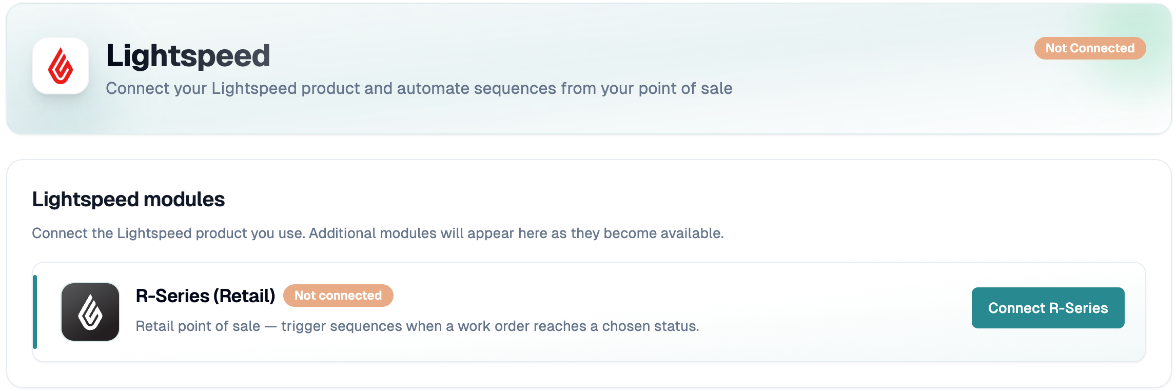
You are redirected to Lightspeed to approve access, then returned to InputKit. The message Lightspeed connected successfully appears and the badge shows Connected.
Create a trigger
In R-Series triggers, click Add trigger.
In Create Trigger, fill in step 1:
Trigger name (optional);
Work order status: the sequence is sent when a work order changes to this status (the list is loaded from your Lightspeed account);
Sequence;
Default location;
Delay (minutes): optional. This integration offers a fixed delay only.
Click Next. In Field Mapping, map the Work Order and Contact properties. Contact first name, last name, phone and email are matched automatically.
In step 3, add optional filters, then click Create trigger.
If the field list is empty, your Lightspeed account probably has no work orders yet. Create one, then try again.
When is a sending created?
InputKit checks Lightspeed every hour (it does not receive instant notifications). Each check looks at work orders changed in the last 3 days. A work order is sent once per trigger. Allow up to about an hour between the status change and the sending, plus your delay.
A work order is skipped if no email or phone number could be matched, or if your filters aren't met (shown as Filtered in the Integration Logs).
To see what happened, open the Integration Logs.
Disconnect
Click Disconnect R-Series. There is no confirmation: the stored authorization and all R-Series triggers are deleted.
If you have any questions, feel free to contact us via the chat.