How to send emails from your own domain (Mailgun)
Register a sending subdomain, add the DNS records and verify it so your sequences come from your own address.
By default, InputKit sends your emails from its own domain. With Mailgun, you can send them from your own subdomain (for example mail.yourcompany.com) once your DNS is verified.
Before you start
You need permission to manage integrations to change anything (view permission is enough to look).
You need access to your domain's DNS settings, or someone who has it.
Register your domain
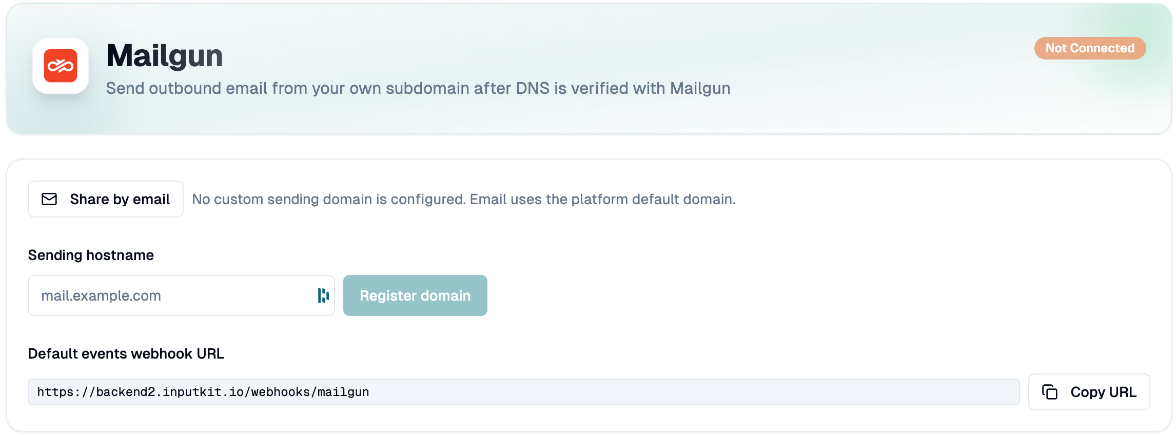
Click your name in the top-right corner, then Integrations, then Add integration and choose Mailgun.
Type your Sending hostname, for example
mail.example.com. Use a hostname only: nohttps://, no/and no@.Click Register domain. Domain registered appears (or Existing Mailgun domain linked if it was already known).
Add the DNS records
InputKit shows Sending DNS records and Receiving DNS records (MX), with the Type, Host / name, Value and Priority of each. Use the copy buttons.
Add each record at your DNS provider.
To ask someone else to do it, click Share by email: enter the Recipient email and click Send email, or Copy DNS records.
Verify
After your DNS has updated (it can take some time), click Refresh status. The verification runs and Verification updated appears.
Each record shows Verified, Unverified or Invalid. The integration shows Pending verification until everything is valid, then Connected.
Once verified, InputKit automatically registers the webhooks it needs to track delivery. If that fails, you will see Webhooks were not registered automatically: click Add InputKit webhooks.
What changes once verified
Your sequence invitation emails and your discussion replies are sent from your domain. Before verification, the default InputKit domain is used.
Remove the domain
Click Remove domain and confirm. The domain is removed from InputKit and from Mailgun, and emails go back to the default domain.
Troubleshooting
"Mailgun took too long to respond": wait a moment and check whether the domain was created before trying again.
Records stay unverified: check that the host and value match exactly, and wait for DNS to propagate.
If you have any questions, feel free to contact us via the chat.