How to connect RateMDs to InputKit
Send satisfied patients to your RateMDs profile and import your RateMDs reviews.
The RateMDs integration does two things: it redirects satisfied patients to your RateMDs rating form, and it imports your RateMDs reviews into InputKit.
Connect RateMDs
Click your name in the top-right corner, then Integrations, then Add integration and choose RateMDs reviews. You need permission to manage integrations.
In Profile URL, paste your RateMDs profile URL, for example
https://www.ratemds.com/doctor-ratings/12345/Dr-Jane-Smith-Toronto-ON.html/. It must be a ratemds.com link to a doctor (/doctor-ratings/) or a clinic (/clinic/) profile.
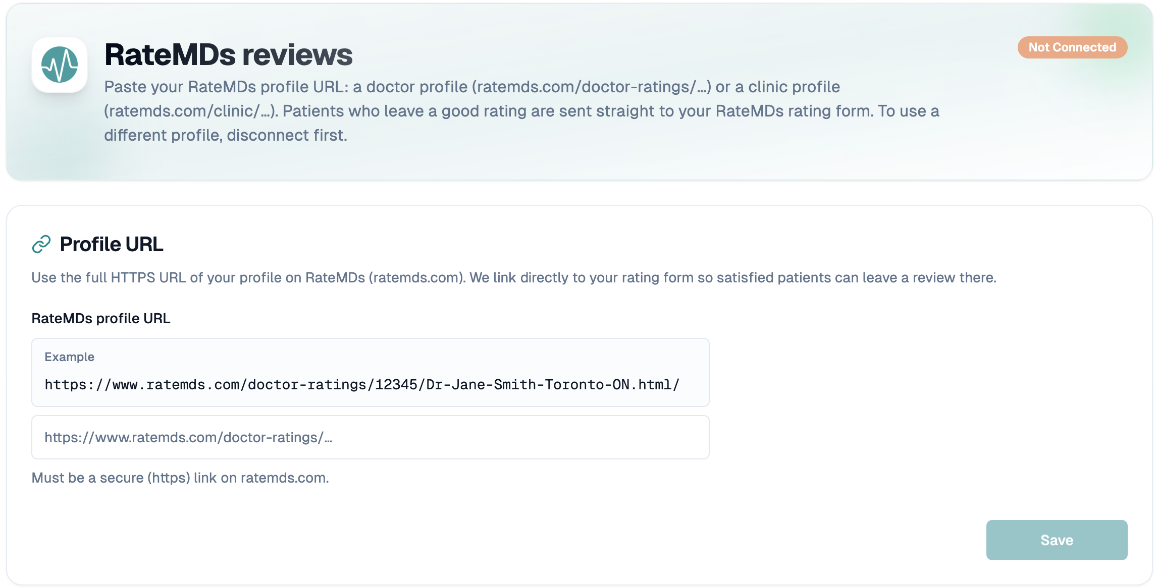
Click Save. After saving, the URL is locked: disconnect first to use a different profile.
Unlike Capterra, saving does not start a sync.
Import your reviews
Click Sync now. The page checks progress and shows the result: RateMDs sync complete, More reviews added (older reviews are still being imported and will continue automatically), or a message asking you to try again in a few minutes.
After that, InputKit checks for new reviews every day. The first time, older reviews are imported gradually over a few days.
RateMDs reviews are anonymous and can't be linked to your customers.
Use RateMDs as a review destination
Once connected, RateMDs can be chosen as a review platform in your sequences, so satisfied patients are sent to your RateMDs rating form.
Read your RateMDs reviews
In the left-hand menu, open Reviews, then RateMDs (it appears once a URL is saved). You can search the reviews, see the RateMDs rating and the number of reviews, and open each one with View on RateMDs.
Disconnect
Click Disconnect and confirm. The saved URL and the synced RateMDs reviews are deleted, and RateMDs no longer appears as a review destination in your sequences.
Troubleshooting
"That link doesn't look like a RateMDs profile": check the link starts with /doctor-ratings/ or /clinic/.
Last sync failed shows the last error. If a sync "did not finish", another sync may be running: try again in a few minutes.
If you have any questions, feel free to contact us via the chat.