How to manage organizations and merge duplicates
Group your customers by organization and let InputKit find duplicate organizations to merge.
Organizations group the customers that belong to the same company (for example, several contacts from one client business). You can then filter customers and reports by organization.
Open the page
Click your name in the top-right corner, then Settings, and open Organizations; or
on the Customers page, click Manage Organizations.

Create an organization
Click Add Organization.
In Add New Organization, enter the Organization Name.
Click Create Organization.
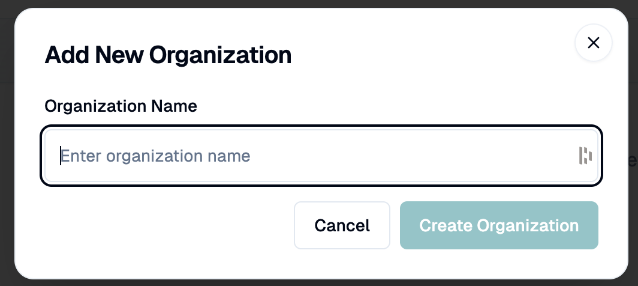
To link a customer, choose the Organization on the customer's record (optional field).
Edit, archive and restore
Edit Organization: change the name or the Active switch, then Update Organization.
To remove one from use, archive it (Deactivate Organization, then Archive). It can be undone.
To see archived ones, choose Archived organizations in the display filter and click Restore.
Find and merge duplicates
Click Find Duplicates. InputKit looks for organizations that appear to be the same (a red badge shows the number of groups found).
In Merge Duplicate Organizations, each group shows a confidence level (high, medium or low) and the reason it was suggested.
For each group, select the organization to keep (the most recent one is selected by default), or click Skip.
Click Merge All.
All customers of the merged organizations are moved to the one you keep, and the duplicates are removed.
Check each group carefully: merging can't be undone.
Where organizations are used
You can filter the customer list by Organization (or No organization), and use organization filters in the Questionnaires report.
If you have any questions, feel free to contact us via the chat.